Tuesday, 22 February 2022

Free Download SVCI J2534 Ford V1.2.5, IDS125, VCI V1.0.0.0(FAQs)

Here we provide 2022 latest version SVCI J2534 Ford V1.2.5, IDS125, VCI V1.0.0.0 free download link, all were tested by OBD2shop engineer. Rest assured download.


SVCI J2534 ford V1.2.5

https://mega.nz/file/fvpkxQAR#7Drt3vyEPSRGpbe4Tum5PzKvTH-5zbPJj6p4EFOLr2A


IDS 125

https://mega.nz/file/2ng0FajQ#n9Zf600-CvQtv48W2BToBaNqf9RK2KemJjHo63ZV4mI


SVCI J2534 VCI V1.0.0.0

https://mega.nz/#!anBG3CZa!SyersJzW3BA_FLFuBBK-hFU2JwGNvuPuWhxrT6QZWsk

free-download-svci-j2534-ford-v1-2-5-ids125-vci-v1-0-0-0-faqs


SVCI J2534 FAQs

1.Does SVCI J2534 support Ford 650?

Yes


2.SVCI J2534 reprogram & calibrate 2003 F250 FICM module, possible?

Yes, it supports.


3.SVCI J2534 supports Ford Mustang Roush 2014?

Yes, it supports.


4.Can SVCI J2534 rewrite Ford Escape 1.6L ECU VIN & key programming?

Yes, it can.


5.Will SVCI J2534 damage the module in case not supporting the car? 

For Ford & Mazda, it won’t.


6.Can SVCI J2534 do incode calculator for Ford 2010/ 2017 Ford Kuga?

Yes.


7.Can SVCI J2534 program 2012 Ford F-250 BCM?

Yes, it can.


8.Can SVCI J2534 work on 2015 Fusion ECM?

Yes.


9.Can SVCI J2534 program 2015 Ford Transit Custom all keys lost?

Yes


10.Can SVCI J2534 enable options in PCM speed control/ cruise control for 2008 Ford Crown Victoria?

Yes, it can.


11.Can SVCI J2534 reprogram PCM for 2009 Ford Edge?

Yes.


12.Use SVCI J2534 to do gearbox learning for 2013 Ford Fiesta, possible?

Yes. 


13.Can SVCI J2534 support 2009 Ford Edge TCM upgrade to the latest?

Yes.


14.Can SVCI J2534 program Toyota Yaris 2009 PCM/ECU?

Yes, it can.


15.SVCI J2534 supports Ford trucks?

Yes. Specific model please contact online service.


16.SVCI J2534 can reprogram 2014 Ford Explorer smart key?

Yes, it can.


17.SVCI J2534 supports 2007 Ford F-250 6.0 diesel vehicle?

Yes.


18.SVCI J2534 supports Ford Transit 2015 PATS online programming?

Yes.


19.SVCI J2534 support OEM Mazda VCI?

Yes.


20.Latest SVCI J2534 support 2010 Ford Fusion PSCM?

Yes. 


21.How to do if SVCI J2534 red light is flashing?

Press the button on device to reconnect.


22.Can SVCI J2534 read & write 2012 Ford F-350 ECU via OBD?

Yes, it can.


23.Can SVCI J2534 program 2012 Ford F-350 Super Duty ECU?

Yes.


24.Can SVCI J2534 program for 2015 Ford Fusion BCM, how to reset new VIN?

Yes. Use the IDS software.


25.SVCI J2534 supports 2017 Ford Flex to program smart key?

Yes.


26.Can FVDI J2534 program original ECU of the GEAR(TCU) online for Ford?

Yes.


27.SVCI J2534 reprogram 2018 Mazda 3 2.0G skyactiv Sportnav ABS module?

Yes.


28.Can SVCI J2534 relearn ECM & FOB separate keys for 2014 Ford Mustang 3.7L?

Yes, both can.


29.Can SVCI J2534 read & rewrite from cc3a 12a650 bda ECU on a 2012 Ford F-350 DRW 6.2L to an used ECU?

Yes, it can.


30.SVCI J2534 flash a 1999 Ford F250 V10 PCM, workable?

Yes. 


31.Can SVCI J2534 support 2012 Ford Fusion made in US?

Yes. 


32.SVCI J2534 supports 6.0 Ford Diesel power stroke 2003 Ford Excursion?

Yes. 


33.Can SVCI J2534 do transmission programming?

Yes, it can.


More any questions feel free to contact us.

www.obd2shop.co.uk


Tuesday, 15 February 2022

Fixed: SVCI 2020 Registry Value RxFIFO or TxFIFO Have Wrong Data!

Problem

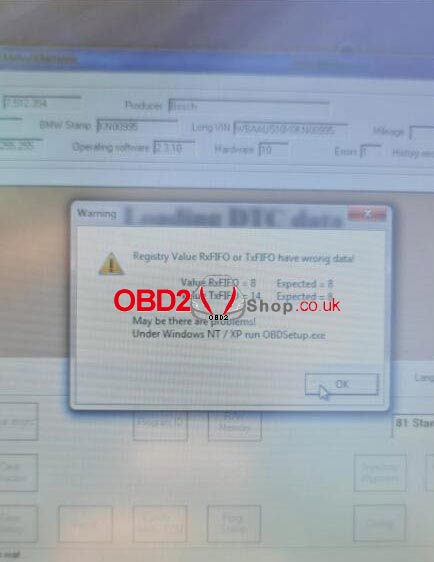
The SVCI 2020 is failed to communicate with a new BMW E46 2001 GEN that has been replaced recently. The warning “Registry value RxFIFO or TxFIFO have wrong data! May be there are problems! Under Windows NT/XP run OBDSetup.exe.” keeps coming out.


I’ve tried several times but was unable to clear the error. Any ideas?

fixed-svci-2020-registry-value-rxfifo-or-txfifo-have-wrong-data-(1)

fixed-svci-2020-registry-value-rxfifo-or-txfifo-have-wrong-data-(2)

Solution

Please follow the steps below, then re-connect device to read fault codes again.

Step1. Open the SVCI 2020 installation directory.

Step2. Enter “C: Program File (x86)\Abrites Commander Software List\Common2\” directory and copy BMW folder to “C: Program Files (x86)\Abrites Commander Software List\Common\” directory


Hope this is helpful.

www.obd2shop.co.uk


Monday, 14 February 2022

Scania VCI3 V2.50.2 Free Download & Installation Win10

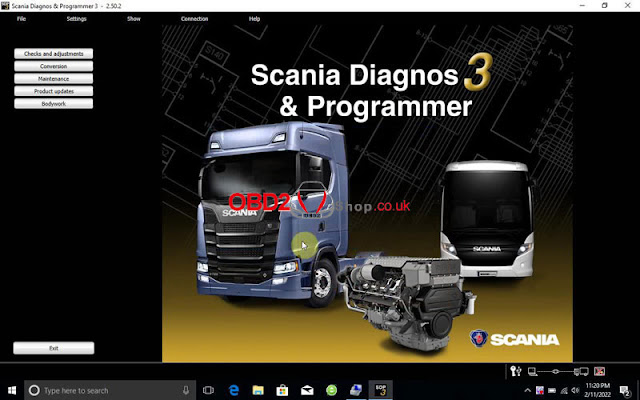
Scania VCI-3 V2.50.2 is a wireless diagnostic software to do maintenance for all Scania trucks, buses, heavy vehicles or heavy duty engines. Here we provide the latest version to download that has been successfully tested.


Where to free download ScaniaVCI3V2.50.2

https://share.weiyun.com/mmCnKbt8

Password: 8xc3a5

Operating system: Windows10 64-bit

(If you don’t have an account, contact OBD2shop online service for help).

Note: this software requires to send us ID for activation after installation.


How to install ScaniaVCI3 Scanner?

https://www.youtube.com/watch?v=98CLoEU8oe8


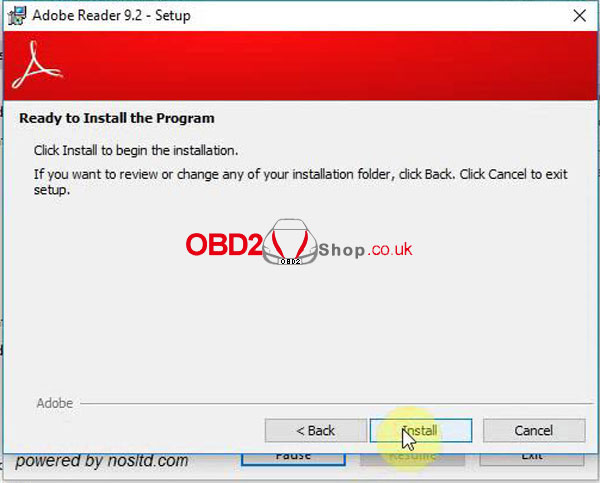
1. Open “Adobe Reader 9.2” to install the program.

thumbnailscania-vci3-free-download-installation-win10-1

2. Unzip Scania package to start “SDP3_2.50.2” setup.

thumbnailscania-vci3-free-download-installation-win10-2

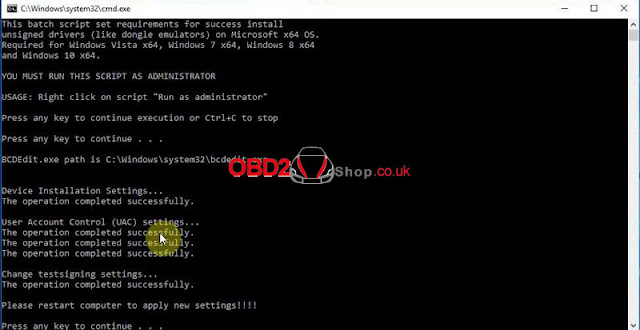
3. Run “prereqset64v3” file in FIX folder.

thumbnailscania-vci3-free-download-installation-win10-3


4. Restart the computer.

thumbnailscania-vci3-free-download-installation-win10-4


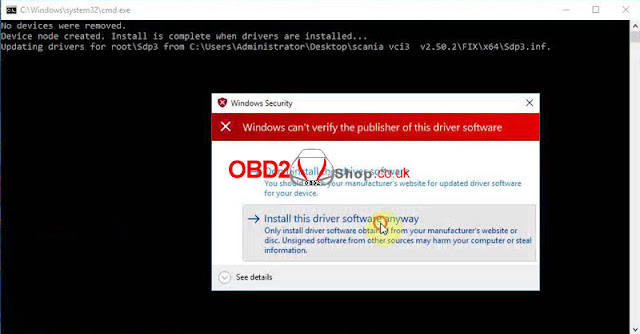
5. Locate & run “install” driver: FIX >> x64 folder.

thumbnailscania-vci3-free-download-installation-win10-5


6. Run “Hardware ID Reader” to get the ID, then send to us for activation.

7. Manage the added registry editor: Yes >> OK.

thumbnailscania-vci3-free-download-installation-win10-6


8. Copy all files in FILE TO REPLACE, paste to SDP3 folder for replacing.

thumbnailscania-vci3-free-download-installation-win10-7


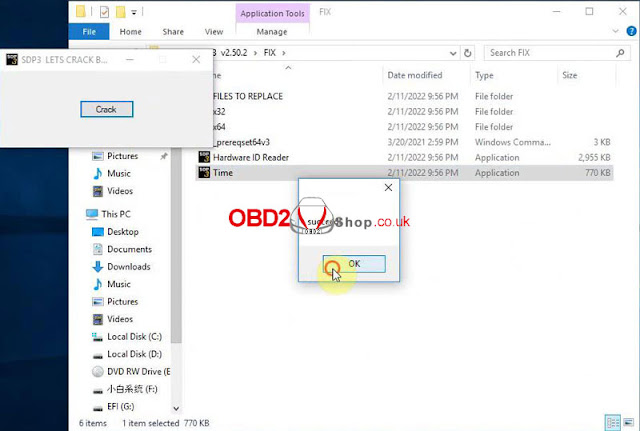
9. Run Time >> Crack >> OK, restart the computer.

thumbnailscania-vci3-free-download-installation-win10-8


We can check if Scania VCI3 is installed successfully in Computer Management.

thumbnailscania-vci3-free-download-installation-win10-9

thumbnailscania-vci3-free-download-installation-win10-10

Done!

www.obd2shop.co.uk


Tuesday, 25 January 2022

Problem

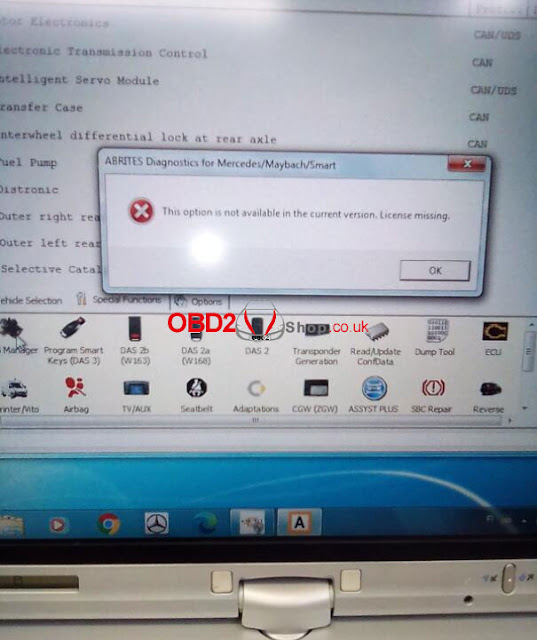
Each time when I was opening SVCI 2020 software to start DAS manager, it always came out a warning: “This option is not available in the current version. License missing”. Any ideas? Please help.

free-download-svci-2020-v12-to-solve-license-missing-warning

Solution

The reason why this warning coming out is because of the incorrect SVCI version. Please download SVCI 2020 V12.0 version, then update firmware.


Free download SVCI 2020 V12.0

https://mega.nz/file/Z8hGjQDK#bRwvtu0kROC0l2YP051lN_Lbqozu34tEYt8DiRu6nQs


This may help:

How to update SVCI 2020 Abrite Commander firmware?

http://blog.obd2shop.co.uk/how-to-update-svci-2020-abrite-commander-firmware/


Update

Thanks to Obd2shop engineer, problem was solved.


Tuesday, 18 January 2022

VXDIAG VCX SE BMW E Series Programming & Coding Tutorial

This is a tutorial on how to use VXDIAG VCX SE engineer edition software to do BMW E series programming & coding.


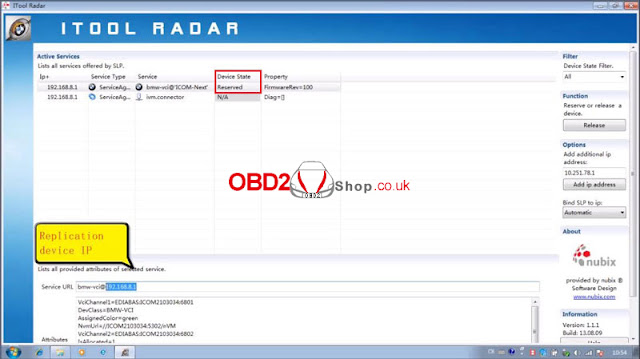
Step1. Open ITool Radar software, Reserve >> Duplicate device IP;


vxdiag-vcx-se-bmw-e-series-programming-coding-tutorial-1

vxdiag-vcx-se-bmw-e-series-programming-coding-tutorial-2


Step2. Open EasyConnect software to paste device IP, selected “ICOM Lock” then “Check”;

vxdiag-vcx-se-bmw-e-series-programming-coding-tutorial-3


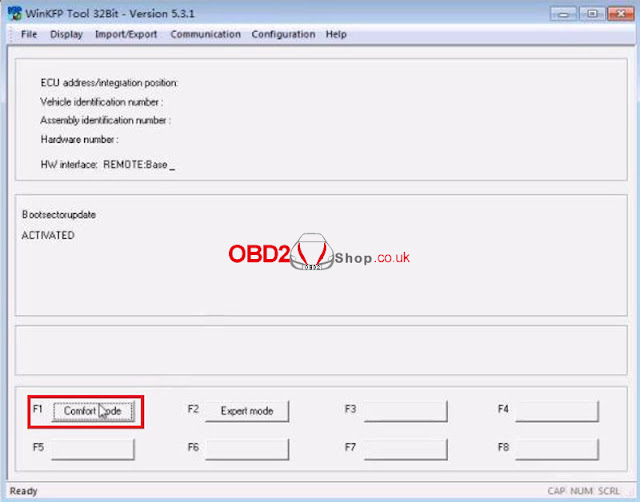
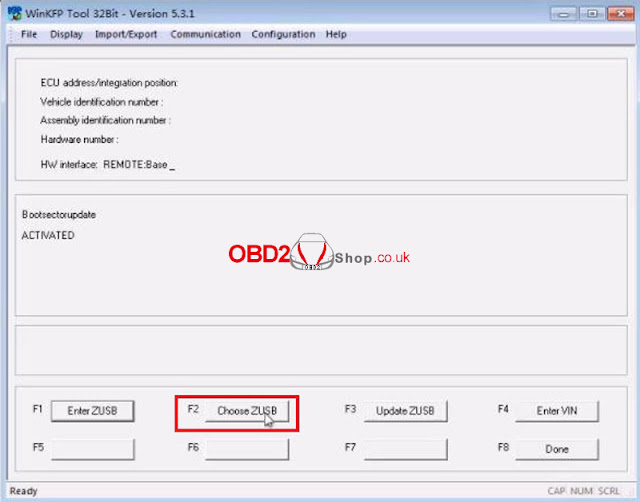
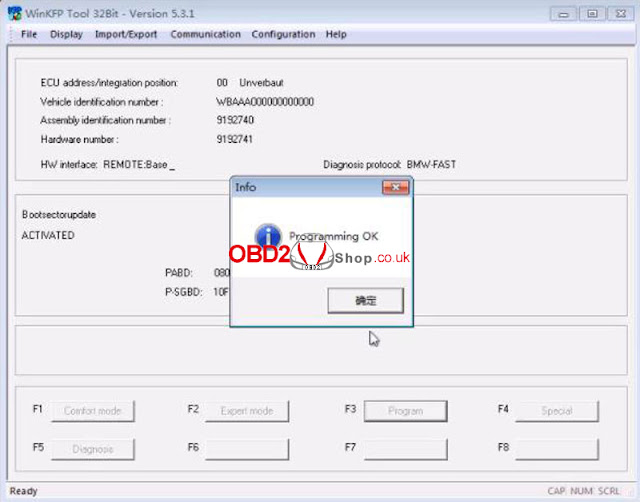
Step3. Open Winkfp software, click Comfort mode >> Choose ZUSB >> Choose assembly identification number/ integration position(ECU family, ZB-number & Integration position) >> OK >> Done >> Enter VIN >> Program


The user info field can still be programmed 1 times.

Program ECU? Click “OK”.

Programming OK.

vxdiag-vcx-se-bmw-e-series-programming-coding-tutorial-4

vxdiag-vcx-se-bmw-e-series-programming-coding-tutorial-5

vxdiag-vcx-se-bmw-e-series-programming-coding-tutorial-6

vxdiag-vcx-se-bmw-e-series-programming-coding-tutorial-7

vxdiag-vcx-se-bmw-e-series-programming-coding-tutorial-8

vxdiag-vcx-se-bmw-e-series-programming-coding-tutorial-9

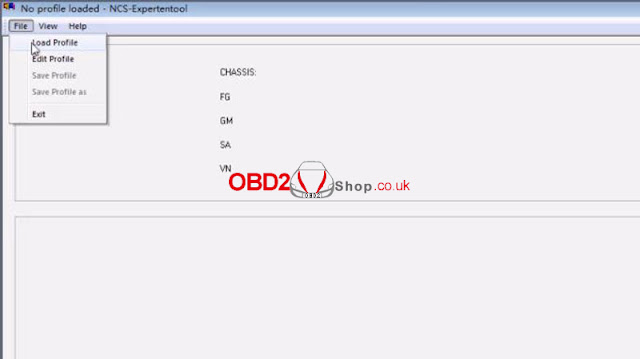
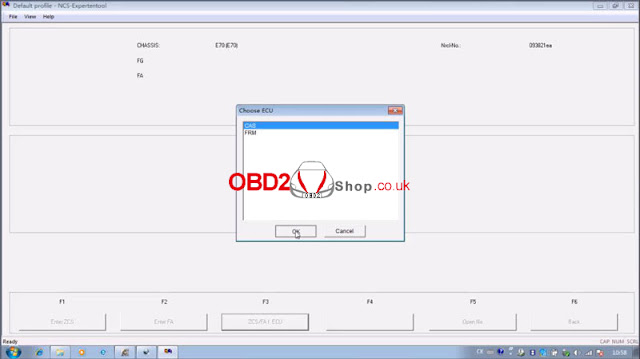
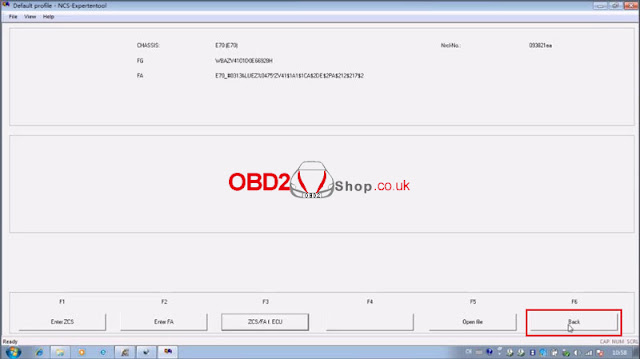
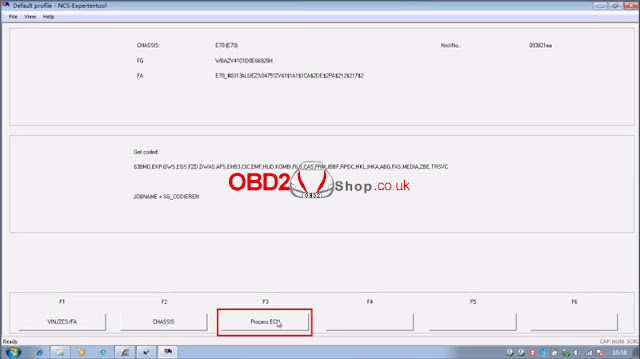
Step4. Open NCS Expert software, click File >> Load profile >> Default profile >> VIN/ZCS/FA >> ZCS/FA I ECU >> Choose chassis: E70 >> Choose ECU: CAS >> Back >> Program ECU >> Choose ECU: JBBF >> Execute job

Coding active.

vxdiag-vcx-se-bmw-e-series-programming-coding-tutorial-10

vxdiag-vcx-se-bmw-e-series-programming-coding-tutorial-11

vxdiag-vcx-se-bmw-e-series-programming-coding-tutorial-12

vxdiag-vcx-se-bmw-e-series-programming-coding-tutorial-13

vxdiag-vcx-se-bmw-e-series-programming-coding-tutorial-14

vxdiag-vcx-se-bmw-e-series-programming-coding-tutorial-15

vxdiag-vcx-se-bmw-e-series-programming-coding-tutorial-16

vxdiag-vcx-se-bmw-e-series-programming-coding-tutorial-17

vxdiag-vcx-se-bmw-e-series-programming-coding-tutorial-18

Done.


This is using VXDIAG VCX SE BMW to do programming & coding CAS E70 as demo.

Thursday, 2 September 2021

Launch X-431 TSGUN Diagnose & Program Porsche CayenneTPMS Sensors OK

 Problem: Porsche Cayenne TPMS sometimes is not working.

Tools used: Launch X-431 TSGUN TPMS + LTR-01 RF Sensor

Launch X-431 TSGUN to diagnose & program TPMS sensors for a Porsche Cayenne 2010 as an example. Supports to work with Launch X-431 Pro3, X-431 Pro5, X-431 PADIII, X-431 PAD V, X-431 V, X-431 V+, X-431 Pros V4.0 via Bluetooth.

Here you are:

How to diagnose TPMS via X-431 TSGUN?

Steps:
Having been selected car model, long press “OK” button and aim X-431 TSGUN at the tire pressure sensor.
There’s a trouble found: OEM sensor battery running low.

How to program TPMS sensors via X-431 TSGUN?

Place a new Launch RF Sensor near, X-431 TSGUN will identify it soon, press  “Programming”.

Wait programming until 100%...
Note: please keep the device close to the tire pressure sensor that needs to be activated.

Succeed!
It’ ll show the sensor details on screen.
The operation is easy, just one-step to finish.

How to active new TPMS sensor via X-431 TSGUN?

After replacing the new RF Sensors into 4 tires.
  1. Select TPMS function and correct car model.
  2. Take X-431 TSGUN close to tire and long press “OK” button in turns.
All RF sensors are activated!


Test new sensors
  1. Go back to diagnose TPMS system on X-431 scanner again. There’s no fault code found.
  2. Test drive about 15 minutes. When sensor reading displaying on dashboard that means all done.


Done!

Tuesday, 17 August 2021

How to fix can't find the “SCN Coding” file in Launch X431 PAD VII?

One Dutch customer gave feedback that he can’t find the “SCN Coding” option in Launch X-431 PAD VII while other users do have. That’s because he didn’t open the configuration file to start online programming function.

 can't find the “SCN Coding”  file in Launch X431 PAD VII 01can't find the “SCN Coding”  file in Launch X431 PAD VII 02

How to start online programming function?

The operation steps apply to Launch X431 PAD V, X-431 PAD VII. In addition to US, Canada & Spain, the rest of region can follow the procedure below to set up.


The online programming option won’t display in Home page, please search it in corresponding diagnostic software.


Steps

  1. Find out “ini”file in the path: Others >> Device >> File manager >> cnlaunch file >> X431PADV >> assets

How to start Launch online programming function 01

How to start Launch online programming function 02

 How to start Launch online programming function 03

How to start Launch online programming function 04

  1. Open and edit “ini”file via text editor, search for fields “OnlineFlash” & “Flash”.

- The defaults are “0”, which means software can’t support online programming.

- Change the defaults to “1”, then save.

- Once saved successfully, the defaults will display “1”, which means software can support online programming.

How to start Launch online programming function 05

Done!

Now you can start to use the online programming function!


This is how to open and start using the online programming function for Launch X431 PAD V & X-431 PAD VII for the first time.

http://blog.obd2shop.co.uk/