Showing posts with label vxdiag vcx se. Show all posts

Monday, 9 September 2024

TOPDON RLink X7 vs VXDIAG VCX SE vs NANO Comparison

TOPDON RLink X7 is a VCI box that can be used with OE software to diagnose, program, modify, and perform other original equipment functions. Supports BMW, Benz, Porsche, VW&GM series models. What's it different from the VXDIAG VCX SE or NANO diagnostic tool? Here we've listed all their functions below:

topdon-rlink-x7-vs-vxdiag-vcx-se-vs-nano-1

TOPDON vs. VXDIAG Comparison

topdon-rlink-x7-vs-vxdiag-vcx-se-vs-nano-2

Conclusion

1. Only TOPDON RLink X7 can support the latest Benz 447 XENTRY24.6 and BMW ISTA 4.48 software.

2. Only VXDIAG VCX SE can support 2002-2016 Porsche PIWIS2 (Engineer) software.

3. RLink X7& VCX SE support more brands while NANO supports less(VW,GM).

topdon-rlink-x7-vs-vxdiag-vcx-se-vs-nano-3

www.obd2shop.co.uk

Thursday, 6 June 2024

(Solved) VXDIAG VCX SE with Full Brands Software not working

Here is the 2 real customers' feedback on how OBD2SHOP.CO.UK engineers resolved their VXDIAG VCX SE software not working issue.


1. From Gualter Canelas (customer from Portugal)

Feedback:

Hello Eliza! How are you? Good?

I have a problem with the ista d program.. it appears to update the ICOM firmware, I already updated the vx diag firmware and license, but it seems that is in the Ista d program.. can you help me, please?

vxdiag-vcx-se-software-not-working-1

Obd2shop.co.uk engineer checked through remote access and found the software update incorrect.


After remote access and finishing the update, the problem was sorted, and worked!

vxdiag-vcx-se-software-not-working-2

Customer feedback:

It's ok to work now!

vxdiag-vcx-se-software-not-working-3

2. From Tibi Dragut ( customer from the UK )

Feedback:

I can't connect the vxdiag to jlr, I reinstalled the software sdd, I opened and connected the vcx, Shows me this

vxdiag-vcx-se-software-not-working-4

The engineer checked through remote access and found he installed all software on the same system,  some software will incompatibility, which may be the reason why JLR does not work, SDD and Ford's software recommend installation on 2 systems.


The customer changed to another laptop system and the feedback worked!

vxdiag-vcx-se-software-not-working-5

For more technical service support, please visit www.obd2shop.co.uk.

Thursday, 25 April 2024

(Solution) VXDIAG VCX SE JLR "VCI Connection not detected"

Customer question:

Hello, Pathfinder can not find VCX SE, what can I do? Also, I have installed the JLR original driver.

vxdiag-vcx-se-jlr-vci-connection-not-detected-1

vxdiag-vcx-se-jlr-vci-connection-not-detected-2

OBD2shop.co.uk engineer responded:

After installing the original driver, then install the VX DOIP driver.

vxdiag-vcx-se-jlr-vci-connection-not-detected-3

Customer feedback:

Reinstalled DOIP and now working fine

THX

vxdiag-vcx-se-jlr-vci-connection-not-detected-4

www.obd2shop.co.uk


Monday, 9 May 2022

Solved: VXDIAG VCX SE VW ODIS "trial period has expired!"

Problem: The VW ODIS 9.10 Software for VXDIAG VCX SE is unable to open. It prompts:" Sorry, but your trial period has expired! You have exceeded 50 trial executions! Please, register this software to remove trial limitation!"

solved-vxdiag-vcx-se-vw-odis-trial-period-has-expired

Solution

Install the unlimited patch below can solve the problem.


Free download VW ODIS 9.10 unrestricted patch:

https://mega.nz/file/0llgTITI#BfxJchSKpMAeOXX_1OtN2HO0h6tCUbpFRNbWkOH7U4w

Size:3.6MB


The patch is used to repair VW expired trial issue in 2TB Software HDD.

Any questions please contact us.


Technical support

www.obd2shop.co.uk

Tuesday, 18 January 2022

VXDIAG VCX SE BMW E Series Programming & Coding Tutorial

This is a tutorial on how to use VXDIAG VCX SE engineer edition software to do BMW E series programming & coding.


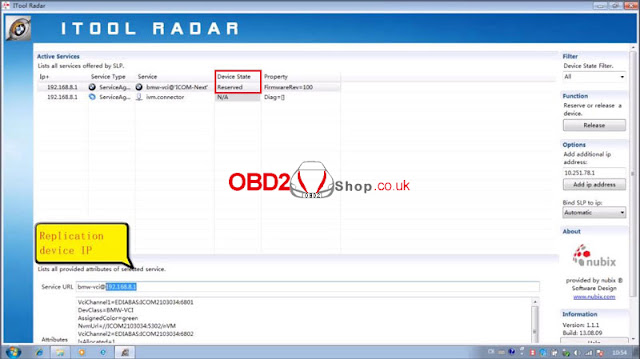
Step1. Open ITool Radar software, Reserve >> Duplicate device IP;


vxdiag-vcx-se-bmw-e-series-programming-coding-tutorial-1

vxdiag-vcx-se-bmw-e-series-programming-coding-tutorial-2


Step2. Open EasyConnect software to paste device IP, selected “ICOM Lock” then “Check”;

vxdiag-vcx-se-bmw-e-series-programming-coding-tutorial-3


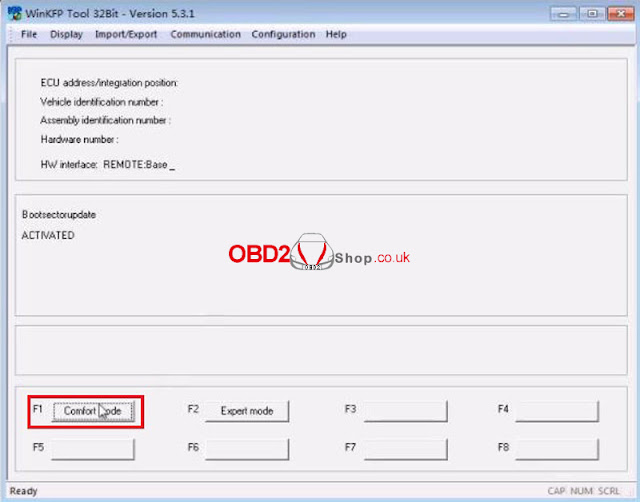
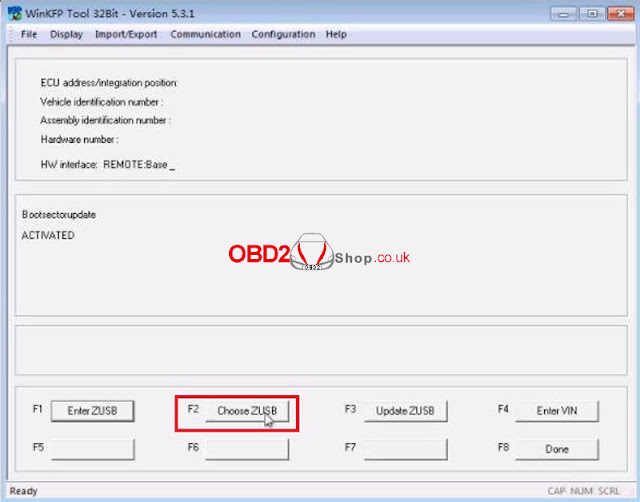
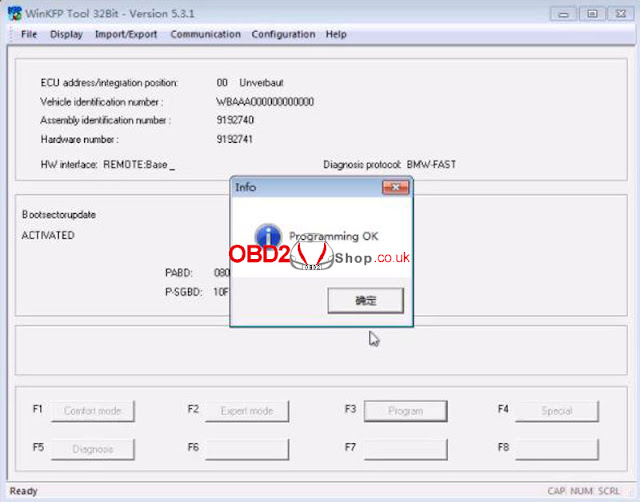
Step3. Open Winkfp software, click Comfort mode >> Choose ZUSB >> Choose assembly identification number/ integration position(ECU family, ZB-number & Integration position) >> OK >> Done >> Enter VIN >> Program


The user info field can still be programmed 1 times.

Program ECU? Click “OK”.

Programming OK.

vxdiag-vcx-se-bmw-e-series-programming-coding-tutorial-4

vxdiag-vcx-se-bmw-e-series-programming-coding-tutorial-5

vxdiag-vcx-se-bmw-e-series-programming-coding-tutorial-6

vxdiag-vcx-se-bmw-e-series-programming-coding-tutorial-7

vxdiag-vcx-se-bmw-e-series-programming-coding-tutorial-8

vxdiag-vcx-se-bmw-e-series-programming-coding-tutorial-9

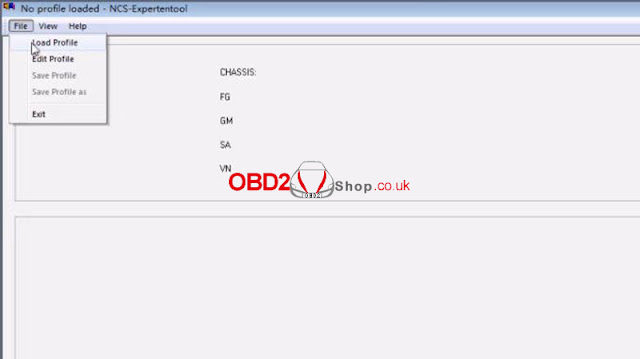
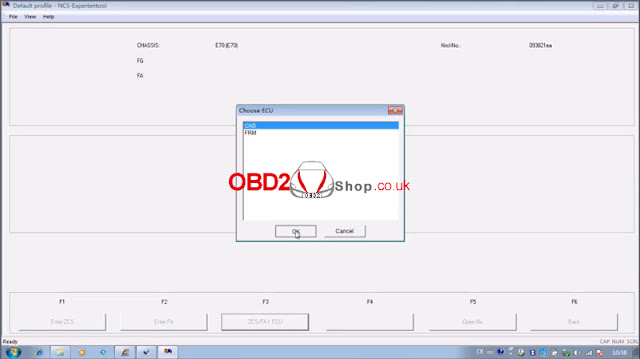
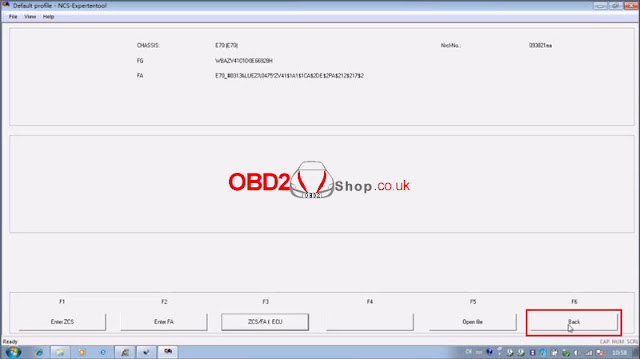
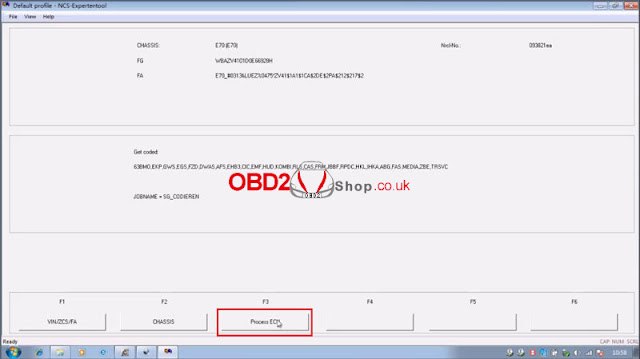
Step4. Open NCS Expert software, click File >> Load profile >> Default profile >> VIN/ZCS/FA >> ZCS/FA I ECU >> Choose chassis: E70 >> Choose ECU: CAS >> Back >> Program ECU >> Choose ECU: JBBF >> Execute job

Coding active.

vxdiag-vcx-se-bmw-e-series-programming-coding-tutorial-10

vxdiag-vcx-se-bmw-e-series-programming-coding-tutorial-11

vxdiag-vcx-se-bmw-e-series-programming-coding-tutorial-12

vxdiag-vcx-se-bmw-e-series-programming-coding-tutorial-13

vxdiag-vcx-se-bmw-e-series-programming-coding-tutorial-14

vxdiag-vcx-se-bmw-e-series-programming-coding-tutorial-15

vxdiag-vcx-se-bmw-e-series-programming-coding-tutorial-16

vxdiag-vcx-se-bmw-e-series-programming-coding-tutorial-17

vxdiag-vcx-se-bmw-e-series-programming-coding-tutorial-18

Done.


This is using VXDIAG VCX SE BMW to do programming & coding CAS E70 as demo.