Showing posts with label scania vci 3. Show all posts

Thursday, 31 March 2022

V2.51.1 Scania VCI-3 SDB3 Free Download 100% Worked

Here we provide the latest version V2.51.1 Scania VCI-3 SDB3 free download link, 100% worked & tested. No virus, rest assured download.


Free download V2.51.1 Scania VCI 3 SDB3:

Mega link:

https://mega.nz/file/Zhsi1C4L#GaEnTY01ZZnINO2ov61-0ZsCPouYpI9ZgosgWtnOKYc

Weiyun link:

https://share.weiyun.com/1Ga5bwwF (password: p3nmun)

Size: 1.07GB

Operating System: Win10 Professional

Note: Need to send ID for activation.

Language: English, German, Spanish, French, Japanese, Dutch, Polish, Portuguese, Swedish, Norwegian, Suomi, Turkish, Italian, Czech, Russian, Chinese

* Any questions for download, feel free to contact the online service.


How to install Scania VCI 3 Scanner?

http://blog.obd2shop.co.uk/scania-vci3-v2-50-2-free-download-installation-win10/


Solved Scania VCI 3 WIFI “unable to connect” on Win10

Question: Scania VCI 3 works well on Win10 via network cable. But if changing to WIFI, it fails. And gave an attention “Unable to connect”. I’ve connected with VCI, it looks OK. What’s the problem?


Solution: 

It needs to set up in Scania VCI-3 software after a successful VCI connection.

Path: Connection >> Connect to wireless VCI

v2-51-1-scania-vci-3-sdb3-free-download-wifi-vci-settings

Technical support:

http://blog.obd2shop.co.uk/


Monday, 14 February 2022

Scania VCI3 V2.50.2 Free Download & Installation Win10

Scania VCI-3 V2.50.2 is a wireless diagnostic software to do maintenance for all Scania trucks, buses, heavy vehicles or heavy duty engines. Here we provide the latest version to download that has been successfully tested.


Where to free download ScaniaVCI3V2.50.2

https://share.weiyun.com/mmCnKbt8

Password: 8xc3a5

Operating system: Windows10 64-bit

(If you don’t have an account, contact OBD2shop online service for help).

Note: this software requires to send us ID for activation after installation.


How to install ScaniaVCI3 Scanner?

https://www.youtube.com/watch?v=98CLoEU8oe8


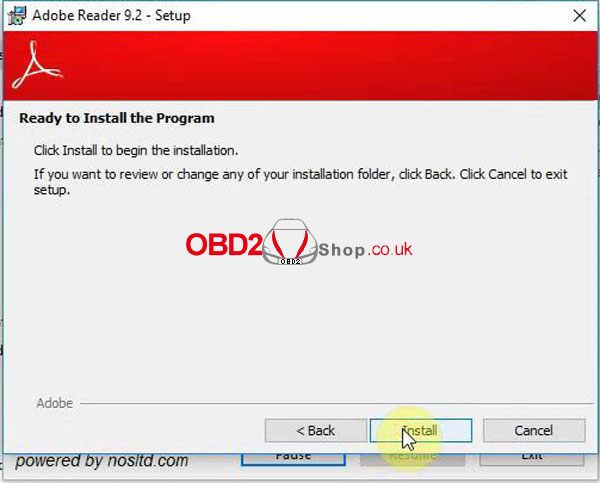
1. Open “Adobe Reader 9.2” to install the program.

thumbnailscania-vci3-free-download-installation-win10-1

2. Unzip Scania package to start “SDP3_2.50.2” setup.

thumbnailscania-vci3-free-download-installation-win10-2

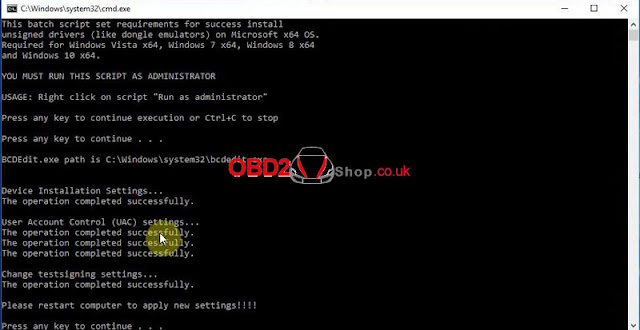
3. Run “prereqset64v3” file in FIX folder.

thumbnailscania-vci3-free-download-installation-win10-3


4. Restart the computer.

thumbnailscania-vci3-free-download-installation-win10-4


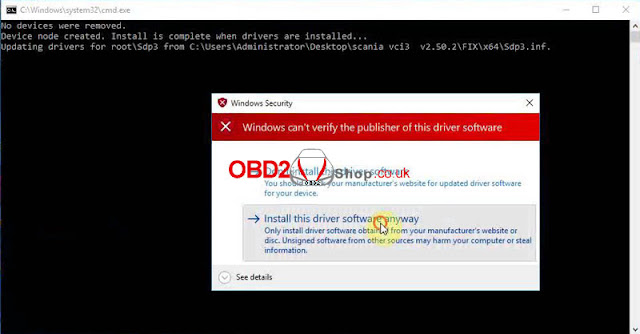
5. Locate & run “install” driver: FIX >> x64 folder.

thumbnailscania-vci3-free-download-installation-win10-5


6. Run “Hardware ID Reader” to get the ID, then send to us for activation.

7. Manage the added registry editor: Yes >> OK.

thumbnailscania-vci3-free-download-installation-win10-6


8. Copy all files in FILE TO REPLACE, paste to SDP3 folder for replacing.

thumbnailscania-vci3-free-download-installation-win10-7


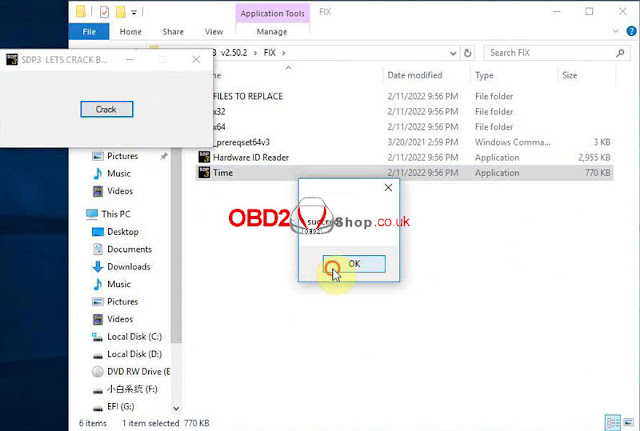
9. Run Time >> Crack >> OK, restart the computer.

thumbnailscania-vci3-free-download-installation-win10-8


We can check if Scania VCI3 is installed successfully in Computer Management.

thumbnailscania-vci3-free-download-installation-win10-9

thumbnailscania-vci3-free-download-installation-win10-10

Done!

www.obd2shop.co.uk