Showing posts with label launch x431. Show all posts

Tuesday, 10 August 2021

Launch X-431 Diagnostic Feedback Guide

 Problem

When I was using the Launch X-PROG 3 and X431 V+ to do key programming, it can read the key and the keyboard lighted up. But the button didn’t respond when pressing “Return” or “Confirm”. The software stopped, no more communication, I can only exit all procedures.


The problem still exists when diagnosing with a car, it prompts “Please terminate the current function first”.

Launch X-431 Diagnostic Feedback Guide 01


Solution

Please submit the diagnostic feedback, Launch engineer will help to solve problem soon.


Steps

Menu >> Settings >> Diagnostic Feedback >> Vehicle Model/ Operation >> Select latest record, Next

Launch X-431 Diagnostic Feedback Guide 02


The way to do diagnostic feedback applies to X431 V, X431 PAD V(PAD 5), X431 PAD VII(PAD 7) as well.


Hope this can help.

http://blog.obd2shop.co.uk/how-to-do-diagnostic-feedback-for-launch-x431-x-prog-3/


Tuesday, 17 November 2020

Ford Lariat Power Balance Test via Launch X431 Pro Mini

This post will show you how to use Launch X431 Pro Mini to do a power balance test for the 2005 Ford F150 Lariat.

Connect the X431 Pro Mini VCI module to OBD2 port of car, go access to main menu to press function buttons.

Tradition Diagnose >> Ford >> Submit >> Automatically Search >> Set ignition switch to ON(Position II), press “OK”>> Yes

launch-x431-pro-mini-power-balance-test-for-ford-lariat-1

launch-x431-pro-mini-power-balance-test-for-ford-lariat-2

Automatically Search >> System Selection >> PCM(Powertrain Control Module)

Special Functions >> Power Balance >> OK

launch-x431-pro-mini-power-balance-test-for-ford-lariat-3

launch-x431-pro-mini-power-balance-test-for-ford-lariat-4

As you can see, there are 8 cylinders. I will put on a little load, put it in drive off, then put my foot on the brake and give it a little gas.

Now you can see No.1 misfired, see how it shot down I can also fill it in the truck. On the No.8 is shot down just at the end because the one getting ready to fire.

launch-x431-pro-mini-power-balance-test-for-ford-lariat-5

launch-x431-pro-mini-power-balance-test-for-ford-lariat-6

Launch X431 Pro Mini is one of the best diagnostic tools to show No.1 has a problem, it turned out to be the coil pack was breaking down. I am going to fix it.

https://www.obd2shop.co.uk/

Thursday, 5 November 2020

How Launch X431 V read data stream & fault code?

Launch X431 V 8 inch tablet with Bluetooth connection supports full system diagnosis. Today I am going to show you how to use Launch X431 V to read data stream and fault code from a Honda Accord.

Turn on the ignition, inset Bluetooth adapter to OBD port of the car, then let’s get to start:

how-launch-x431-v-read-data-stream-and-fault-code-01

Open Launch app on X431 V tablet

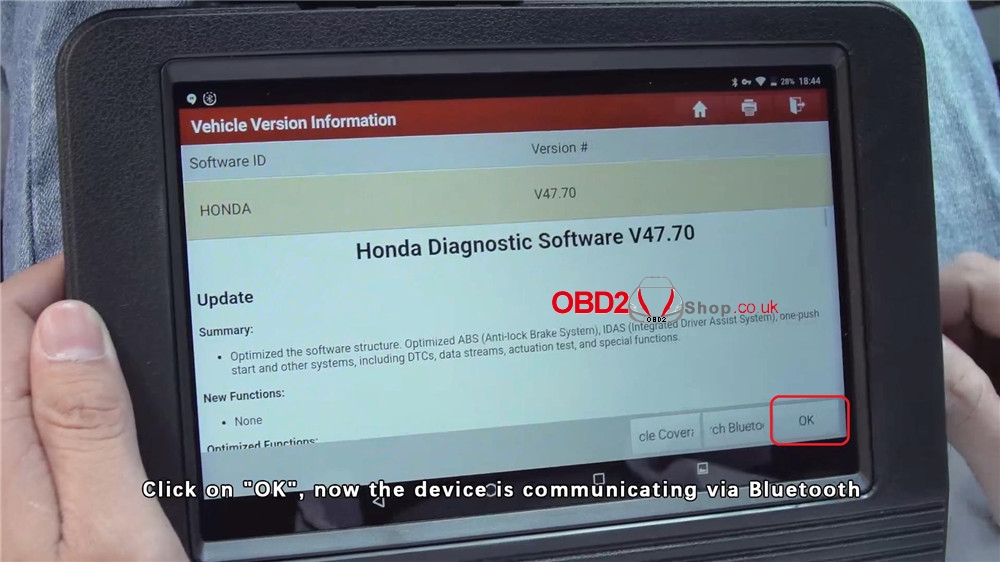
Local Diagnose >> HONDA >> Press “OK”, the device is loading communication...

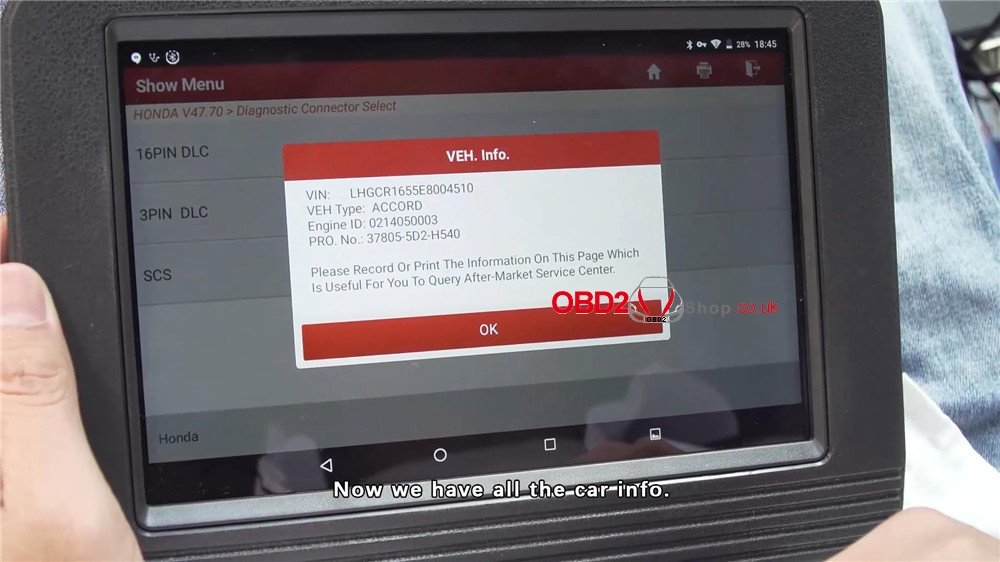
16PIN DLC >> Now you can see the car information on the screen, press “OK”>> System Selection

how-launch-x431-v-read-data-stream-and-fault-code-02

how-launch-x431-v-read-data-stream-and-fault-code-03

how-launch-x431-v-read-data-stream-and-fault-code-04

how-launch-x431-v-read-data-stream-and-fault-code-05

how-launch-x431-v-read-data-stream-and-fault-code-06

how-launch-x431-v-read-data-stream-and-fault-code-07

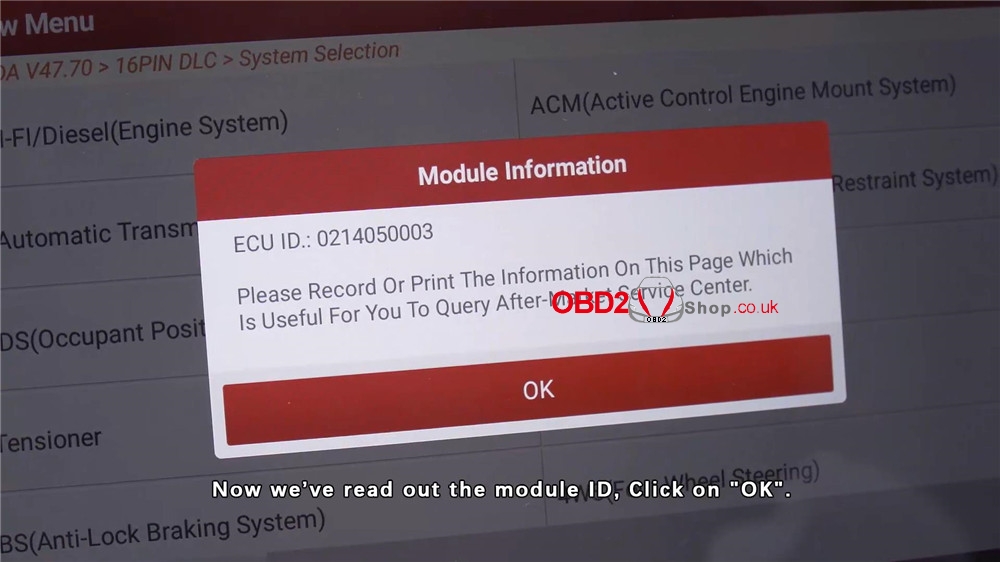
PGM-FI/Diesel (Engine System) >> Now you can see the module information, press “OK”>> Read Data Stream >> Manual Select

how-launch-x431-v-read-data-stream-and-fault-code-08

how-launch-x431-v-read-data-stream-and-fault-code-09

how-launch-x431-v-read-data-stream-and-fault-code-10

Select All >> Start the engine, press “OK”>> Press any icon on the right side to see its waveform

how-launch-x431-v-read-data-stream-and-fault-code-11

how-launch-x431-v-read-data-stream-and-fault-code-12

how-launch-x431-v-read-data-stream-and-fault-code-13

how-launch-x431-v-read-data-stream-and-fault-code-14

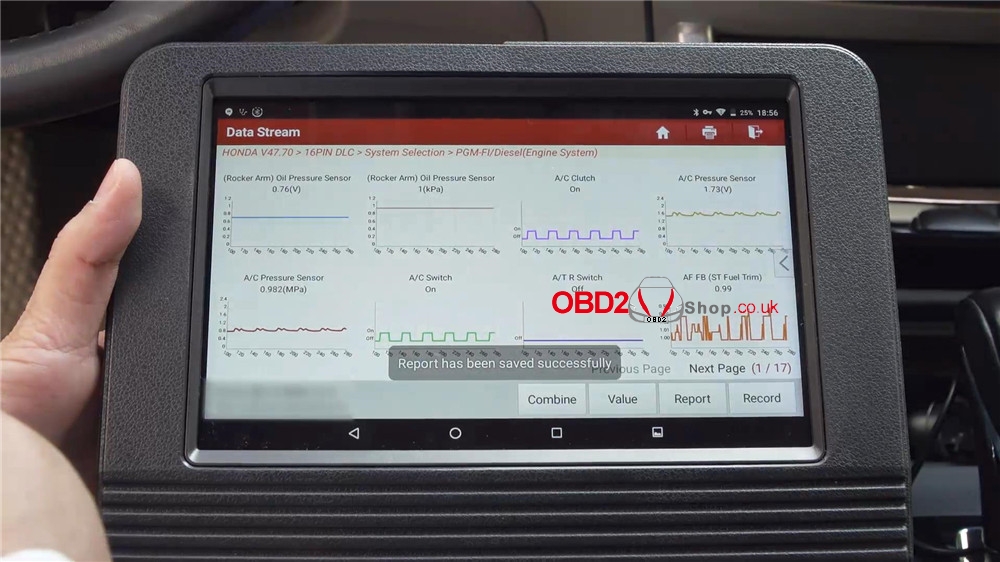
Exit to press “Graph”, you can see 8 waveforms are changing at the same time. All waveforms are normal.

To save the report, press “Report”>> OK >> OK

how-launch-x431-v-read-data-stream-and-fault-code-15

how-launch-x431-v-read-data-stream-and-fault-code-16

Now exit back to show menu, press "Read Fault Code", you will get a page of different fault codes. The "Help" menu explains codes in details and helps to repair the car. 

To save the report, press "Report">> OK >> OK 

The report has been saved successfully!

how-launch-x431-v-read-data-stream-and-fault-code-17

how-launch-x431-v-read-data-stream-and-fault-code-18

Launch X431 V diagnostic tool also support 16 special functions, such as oil reset, IMMO reset, TPMS reset, ABS bleeding, EPB reset, etc.

For more functions overview, please refer to the full video:


Any questions please let us know.

https://www.obd2shop.co.uk/


Thursday, 11 July 2019

Comparison of Launch CRP123X, CRP123 and CRP123E

Question: What're the differences between Launch CRP123X, CRP123, and CRP123E.
Here is the answer:

Item Name
CRP123 CRP123X CRP123E
Image


Size
3.5 Inches 5 Inches 5 Inches
Operating System
ARM Android 7.0 Android
Display Screen
320*480 TFT LCD 1280*720 IPS Touchscreen 1280*720 IPS TouchScreen
Navigation & Hot Keys
√ √
(Designed for Intensive Work)
x
Battery
x 4000mAh 4000mAh
Protocols
OBD2, EOBD OBD2, EOBD, JOBD, KOBD OBD2, EOBD, JOBD, KOBD
Support Systems
Engine/ABS/SRS/AT Engine/ABS/SRS/AT Engine/ABS/SRS/AT
Reset Functions
x x x
Vehicle Coverage 
41 Car Brands  57 Car Brands  57 Car Brands 
AutoVIN
x √ √
Battery Voltage Test
x √ √
Diagnostic History & Quick Access to Re-Diagnostic
x √ √
Diagnostic Feedback & Tech. Support
x √ √
Automatic Inspection Report
x √ √
Data Record and Playback
√ √ √
DTC LookUp
√ √ √
Support Languages
English, Spanish, French, German,
Italian, Russian, Japanese,
Portuguese (8)
English, Spanish, French, German,
Italian, Russian, Japanese,
Portuguese, Korean (9)
English, Spanish, French, German,
Italian, Russian, Japanese,
Portuguese, Korean (9)
Print
Print via PC Print via Email Share Print via Email Share
Update Way
Update via PC One-Click Update via WiFi One-Click Update via WiFi
Update Period
Lifetime Free Update Lifetime Free Update Lifetime Free Update

www.obd2shop.co.uk

Thursday, 12 April 2018

2018 Launch X431 EasyDiag 3.0 Plus with 2 free Vehicles Software

This Launch X431 EasyDiag 3.0 Plus includes 2 free vesicles software+DEMO+EOBD, it is easy to work with your ios device, making your iPhone or iPad a powerful diagnostic scanner!

Launch X431 Easydiag 3.0 plus Description:

This new powerful tool is easy to work with your ios device, making your iPhone or iPad a powerful diagnostic scanner!
This tool can update on launch website,once your register successfully, you can choose the car brands software based on your requirment and pay for it,then you can download to your iPhone or iPad or Android device.
Then, connect your iPhone / iPad / Android device with Launch X431 EasyDiag, you can diagnose the cars.
This tool does not require an interface. A single Bluetooth connector along with the company's software allows the user to select from over
30 manufacturers for Asian, European and Domestic applications.

X431 Easydiag 3.0 plus Features and Functions:

1. Full OBDII generic code reader/scanner capability included at no charge
2. Read and clear codes on all vehicle systems
3. Complete system and subsystem coverage (engine, ABS, SRS, transmission and more) with live date and color graphing
4. Enhanced live date and for all vehicle system
5. Includes Bluetooth OBDII connector-optional extension cable available for easier plugging and unplugging of OBDII connector
6. Intuitive interface and easy to use
7. Customizable software-choose from over 70 Asian, European and North American manufacturer for enhanced capability
8. Single carline software priced individually per vehicle manufacturer Additional coverage, capabilities and functions with each new software update

Easydiag 3.0 Language Support:

Chinese Simplified, English, Chinese Traditional, Japanese, Korean, French, Spanish, Portuguese, Italian, Russian, German, Polish, Romanian, Dutch, Arabic, Czech, Danish, Greek, Persian , Finnish, Hungarian, Swedish, Turkish, Serbian, Croatian

X431 Easydiag 3.0 plus vehicle support:

USA: for BXGM, for CHRYSLER, for G-M, for USAFORD

European: for AUDI, for BENZ, for BMW, for CITROEN, for DACIA, for EUROFORD, for FIAT, for GAZ, for GMSA, for JAGUAR, for LANCIA, for LANDROVER, for MINI, for OPEL, for PEUGEOT, for PORSCHE, for RENAULT, for ROMEO, for ROVER, for SAAB, for SEAT, for SKODA, for SMART, for SPRINTER, for VAZ, for VOLVO, for VW, for FORD

Aisan: for ACURA, for DAEWOO, for DAIHATSU, for HOLDEN, for HONDA, for HYUNDAI, for INFINITI, for JPISUZU, for KIA, for LEXUS, for MAHINDRA, for MARUTI, for MAZDA, for MITSUBISHI, for NISSAN, for PERODUA, for PROTON, for SSANGYONG, for SBARU, for SUZUKI, for TATA, for TLISUZU, for TOYOTA

Please kindly note that:

1. Precautions on operating vehicle's ECU
2. Do not disconnect the vehicle inner consume when the ignition switch is on, so as to avoid the sensors or the ECU damage.
3. Do not place the magnetic object near the ECU in order to avoid the failure of the circuitry and components.
4. Do cut off the power supply of ECU system before welding on the vehicle.
5. Pay more attention to the ECU and the sensors when the operation is next to them.
6. Ground yourself when you disassemble PROM,otherwise ECU and sensors will be damaged by static electricity.
7. Do connect ECU harness connector firmly,otherwise electronic elements, such as IC inside ECU, will be damaged.
8. The instrument is a precision electronic instrument. Pay more attention when in use, do not have it dashed.
9. The equipment power is supplied by 12v battery voltage;do not use other voltage power.
10. Turn off the ignition switch when connect or disconnect the diagnostic connector.
11. Put the EasyDiag in its place on the back of the protective casing in order to avoid lost.

Easydiag 3.0 vs. Easydiag 2.0

ItemEasydiag 3.0Easydiag 2.0
Image     Launch X431 Easydiag 3.0  Launch Easydiag 2.0
Operating temperature-10℃ ~ 50℃-10℃ ~ 50℃
Operating Voltage9~18V9~18V
Working current≤100mA≤100mA
Diagnosis methodBluetooth 4.2Bluetooth 2.0
X431 Easydiag 3.0 Package including:

1pc x EasyDiag Connector
1pc x Password Paper

X431 Easydiag 3.0 Package including


Tuesday, 19 December 2017

How to register on launch x431 v 8 inch tablet

This post will tell you how to  register on Launch X431 V 8inch. For new users, please follow the operation chart shown in Fig. 4-1 to get familiar with and start using X-431 V.


During initial use, tap the X-431 V icon on the home screen and you will see
some illustrations that guide you through some of important operations of the
application. Scroll your screen to left to read it until the “Start Now” page appears.
Tap “Start Now” to enter the main menu screen.

Then tap “Login” on the upper right corner of the main menu screen:

Fig. 4-2
 As a new user, you should tap “New Registration” first as the Fig. 4-3 below :

Fig. 4-3
Note: To obtain better service, you need to provide real information.

In Fig. 4-3, fill in the information in each field (Items with * must be filled). After
inputting, tap “Register”, a screen similar to the following will appear:

Fig. 4-4
In Fig. 4-4, input the Serial Number and Activation Code, which can be found in the password envelope.

Fig. 4-5
Note: To exit and activate it later, tap “Skip”. In this case, you can activate your
connector by tapping “Activate Connector” in “Profile”. For details, please refer to Chapter 4.7.2 Activate Connector.

Tap “Activate” to finish your registration. See Fig. 4-6.

Fig. 4-6
Completed registration!!

If you want to know more info you can download the launch x431 v 8 inch tablet user manual here!