Thursday, 13 June 2019

Free download ODIS 5.1.3 PostSetup 86.0.10 Launcher +License

ODIS 5.1.3 PostSetup 86.0.10 is verified working great with no bug, it is compatible with VCX NANO 5054, VAS5054A and VAS6154.

1. Share Free Version: 
ODIS 5.1.3 and post-setup + Flashdata without the activation files. https://mega.nz/#F!xB8wHIRD!JyYLxBi-ktDbPSOhkWUjnQ
https://mega.nz/#!G1pknSZJ!YL35mSvqviDEMrSZz12C-6ctAs7TQ275Ah10CKFkZ_Y

Security: unknown, you try it at your own lucky.

Compatible with VAS5054A and VAS6154
Multilanguage available
odis-5-1-3-001

odis-5-1-3-002


2. Share tested version ODIS 5.1.3 PostSetup 86.0.10: 

Security: yes, 100% safe, download from http://www.vxdiag.net
Size: 2TB disk

Works with VCX NANO 5054 cable to perform:
Programming...confirmed
Coding ...confirmed
Programming key ...confirmed
VW Audi coverage: 2001 -2018 year

ODIS 5.1.3 language is multiple choice:
odis-language-01

odis-language-02

odis-language-03


ODIS 5.1.3 Setup:
http://www.vxdiag.net/wiki/en/#!pages/Volkswagen/ODIS_Install/index.md
Same as ODIS V4.4.10
WIN7...confirmed
win10...confirmed
Win8...not stable

Note:
It is recommended to open the automatic installer with administrator privileges.
odis-5-1-3-install-auto-04


ODIS 5.1.3 Software capabilities:

- Estimated remaining times are shown for ECU flash operations.

- Diagnostic protocol contains interruptions of GFF sessions, extended measurement values, improved ECU communication view, used diagnostic hardware, connection type of diagnostic hardware, operating system, the hotfix used and submissions of support requests

- The measured value display has been improved.

- Documents in GFF are displayed in separate windows.

- One message box will be shown at the beginning of the test drive mode.

- GFF hotfixes can be integrated during diagnostic sessions.

- Danger messages have been revised.

- Stopping of diagnostic sessions may be interrupted.

- Automatic deletion of autosave diagnostic protocols after successful transmission.

- Selection of PassThru diagnostic hardware has been improved.

- ODIS Service Software update has been stabilized.

ODIS 5.1.3 questions and answer:

Question: Downloaded vxdiag ODIS 5.1.3 to install and get the following error, I exit the software, reboot the computer, got the same error.

odis error-05


Answer: The computer has no big enough storage.
It needs 29.1GB.
odis-space-06

To be continued...

http://blog.obd2shop.co.uk/free-download-odis-5-1-3-postsetup-86-0-10-launcher-license/

Monday, 13 May 2019

Use IDS V108 or IDS V112 on Ford VCM2 clone?

IDS V108 is safe and IDS V112 is risky to run with Ford VCM2 clone.

IDS V108: Ford VCM2 China Clone (SP177-C /SP177-C1) is supposed to run the newest IDS V108 instead of newest IDS V112, because if run with IDS V112, it is risky to have blacklisted machine.

IDS V112: safe to run with VCMII SP177-2
vcm2-sp177-2


Question: how do I know if my VCM2 is SP177-C or SP177-C1 or SP177-1?
1. You can back to the seller to check your shopping list.

2. Or if possible, to open the shell to check the internal PCB.
Here vcm2 sp177-C PCB: 
vcm2-sp177-c-pcb-1

vcm2-sp177-c-pcb-2

vcm2-sp177-c-pcb-3

vcm2-sp177-c-pcb-4


Here vcm2 sp177-C1 PCB: 
sp177c1-vcm2-good-clone-pcb-01

sp177c1-vcm2-good-clone-pcb-02

sp177c1-vcm2-good-clone-pcb-03


Here vcm2 sp177-2 PCB:

vcm2-sp177-2-pcb-01

vcm2-sp177-2-pcb-02

vcm2-sp177-2-pcb-03

vcm2-sp177-2-pcb-04

vcm2-sp177-2-pcb-05

vcm2-sp177-2-pcb-06

vcm2-sp177-2-pcb-07

vcm2-sp177-2-pcb-08


For your information: IDS V112 is running greatly with VXDIAG VCX NANO Ford Mazda cable.
vxdiag-nano-ford-ids-v112-ok-on-ford-ranger-2002-on-win8-01

The left one is the WIFI version, the right one is the USB version.

For example: VXDIAG VCX NANO Ford Mazda cable running IDS V112 is able to install on WIN8 and diagnose FORD RANGER 2002 like scan, autotest, read trouble codes, etc.

IMPORTANT: you have to use the IDS-patch to open the IDS software, otherwise it failed. 

Here Ford IDS programming Patch file for free download, with it IDS v112 has module programming capability.
http://www.obd2shop.co.uk/wholesale/vxdiag-vcx-nano-2-in-1-with-wifi.html
vxdiag-nano-ford-ids-v112-ok-on-ford-ranger-2002-on-win8-01

vxdiag-nano-ford-ids-v112-ok-on-ford-ranger-2002-on-win8-02

vxdiag-nano-ford-ids-v112-ok-on-ford-ranger-2002-on-win8-03

vxdiag-nano-ford-ids-v112-ok-on-ford-ranger-2002-on-win8-04

vxdiag-nano-ford-ids-v112-ok-on-ford-ranger-2002-on-win8-05

vxdiag-nano-ford-ids-v112-ok-on-ford-ranger-2002-on-win8-06

vxdiag-nano-ford-ids-v112-ok-on-ford-ranger-2002-on-win8-07

vxdiag-nano-ford-ids-v112-ok-on-ford-ranger-2002-on-win8-08

vxdiag-nano-ford-ids-v112-ok-on-ford-ranger-2002-on-win8-09

vxdiag-nano-ford-ids-v112-ok-on-ford-ranger-2002-on-win8-10

vxdiag-nano-ford-ids-v112-ok-on-ford-ranger-2002-on-win8-11

vxdiag-nano-ford-ids-v112-ok-on-ford-ranger-2002-on-win8-12

vxdiag-nano-ford-ids-v112-ok-on-ford-ranger-2002-on-win8-13

vxdiag-nano-ford-ids-v112-ok-on-ford-ranger-2002-on-win8-14

vxdiag-nano-ford-ids-v112-ok-on-ford-ranger-2002-on-win8-15

vxdiag-nano-ford-ids-v112-ok-on-ford-ranger-2002-on-win8-16

vxdiag-nano-ford-ids-v112-ok-on-ford-ranger-2002-on-win8-17

http://blog.obd2shop.co.uk/use-ids-v108-or-ids-v112-on-ford-vcm2-clone/


Thursday, 25 April 2019

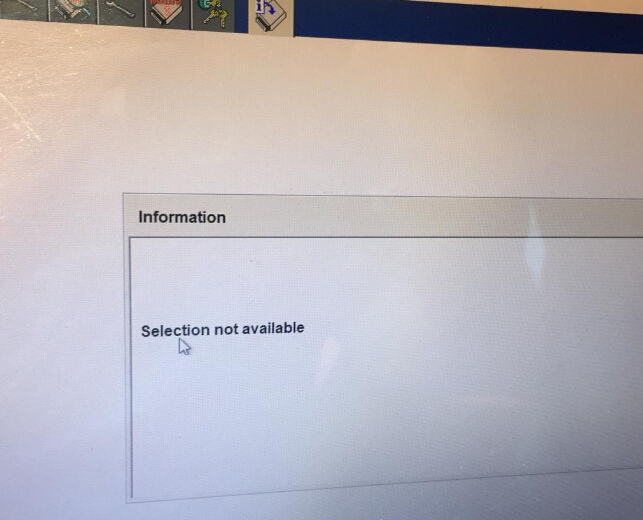
(Fixed) Fly VCM IDS 3 Module programming "Selection not available"

Tried to use Fly VCM IDS 3 V111.03 to perform module programming with no luck, got the error " Selection not available".

ids3-module-programming-01


The reason:
The programming menu is lost.

The solution offered by obd2sho.co.uk engineer:
Free download Ford VCM3 patch to enable the module programming:

After installing the VCM3 patch, module programming will work.
ids3-module-programming-02


ids3-module-programming-03

ids3-module-programming-04

ids3-module-programming-05

ids3-module-programming-06


ids3-module-programming-07


Thursday, 21 February 2019

How to solve Scania VCI3 V2.31.0.277.0 "Activate Software Key" message?

Scania VCI3 V2.31.0.277.0 got this activation message shown as below, that means you need to install and crack correctly.

active-scania-vci3-v2.31.0.277.0-01


The solution offered by obd2shop.co.uk:
Install and crack Scania VCI3 V2.31.0.277.0 by following this video


Works on window7 32bit
Apply to VCI3 for Scania Wifi Wireless Diagnostic Tool
scania-vci3-wifi-sh58-02


Guide:
Go to Computer/DVD/CD-ROM Drive (E:) SDP3 V2.31

Scania-sdp3-2.31-files


Step 1: Open “AdbeRdr920_en_US.exe” to install Adobe Reader 9.2

Scania-sdp3-2.31-windows-7-64-bit-setup-1


Step 2: Open “NDP46-KB3045557-x85-x640-allOS-ENU.exe” to install .NET Framework 4.6.2
Scania-sdp3-2.31-windows-7-64-bit-setup-2


Step 3: Open and install “Scania Diagnosis & Programmer 3 2.31.exe”

Scania-sdp3-2.31-windows-7-64-bit-setup-3

Scania-sdp3-2.31-windows-7-64-bit-setup-3

Scania-sdp3-2.31-windows-7-64-bit-setup-5

Step 4: Copy folder “sdp3 patch 2.31” from disk E: to Desktop

Right click on Desktop

Select Personalize

And go to Control Panel->User Accounts and Family Safety->User Accounts

Change user accounts control settings: Never notify

Scania-sdp3-2.31-windows-7-64-bit-setup-6

Scania-sdp3-2.31-windows-7-64-bit-setup-7


Then open folder “sdp3 patch 2.31” on Desktop

Run “tmode” Windows batch file as administrator

Restart your computer

Step 5: Run “install_driver” windows bactch file in Desktop/sdp3 patch 2.31/drivers Run as administrator

Scania-sdp3-2.31-windows-7-64-bit-setup-8


Run “install” in Desktop/sdp3 patch 2.31

Run as administrator

Windows security: Install this driver software anyway

Driver installed successfully

Scania-sdp3-2.31-windows-7-64-bit-setup-9

Scania-sdp3-2.31-windows-7-64-bit-setup-10


Step 6: Crack SDP3 2.31 software

Copy all files (SCOMM_SSK.dat, SCOMM_SSK_HL.dll) in Desktop/sdp3 patch 2.31/FIX SDP3 2.31

Open SDP3 Properties

Open file location: Computer/C:/Program files (x86)/Scania/SDP3

Copy and replace files

Scania-sdp3-2.31-windows-7-64-bit-setup-11


Step 7: Run SDP3 then exit

Scania-sdp3-2.31-windows-7-64-bit-setup-12

Scania-sdp3-2.31-windows-7-64-bit-setup-13

Scania-sdp3-2.31-windows-7-64-bit-setup-14

Scania-sdp3-2.31-windows-7-64-bit-setup-15


Step 8: Change a language via SDP3 Configurator

Run SDP3 Configurator as administrator

Select a language to use

SDP3 languages: German/ English/ Spanish/ Finnish/ French/ Italian/ Japanese/ Korean/ Dutch/ Polish/ Arabic/ Portuguese/ Russian/ Swedish/ Turkish/ Chinese/ Traditional Chinese/ Romanian

Here: Chinese

Step 9: Run SDP3 Chinese

Scania-sdp3-2.31-windows-7-64-bit-setup-16


It’s in Chinese

Change the language successfully

So, you can change Scania SDP3 language as you want, with SDP3 Configurator

http://blog.obd2shop.co.uk/how-to-solve-scania-vci3-v2-31-0-277-0-activate-software-key-message/