Here is the VPECKER E4 Tablet New Update - HYUNDAI and KIA information, please keep reading to find out more.
HYUNDAI V22.0
1. Updated Europe/General Area vehicle coverage up to 2019.
2. Added 23 Vehicle models:
ACCENT(HC), ACCENT(HCI), ACCENT/SOLARIS(HCR), CRETA(GS), CRETA(GSB), CRETA(GSR), ELANTRA(ADI), G70(IK), GALLOPER-2(M1)-PDF, GENESIS COUPE(BK)-U.S., GENESIS(BH)-U.S., GRANDEUR/AZERA(IG), H350(EU), i30(PD), i30(PDE), i30N(PDEN), IONIQ PHEV(AE PHEV), KONA(OS), SONATA HYBRID(LF HEV), SONATA HYBRID(LF HEV)-U.S., TUCSON(LM)-BRAZIL, TUCSON(TLe), TUCSON(TLI).
3. Added 39 kinds of special functions:
1) 12V Current Sensor Offset Correction Function
2) Air Cut Off Valve Open Mode
3) Alternator TEST
4) AMP Operation Test
5) Assembly Check
6) Assembly Check (ECU replacement)
7) AT Adaptation Mode
8) AVM Calibration
9) AVM Tolerance compensation - Auto
10) Break Pad Change Mode
11) BSD variant coding
12) Checking the wear amount of clutch
13) Clutch compensation value setting
14) Engine Clutch/Motor Resolver Adaptation
15) Engine coolant filling mode
16) EOP TEST (Electric Oil Pump Test)
17) EPCU (MCU) self - diagnosis function
18) Erase Network Configuration
19) Fluid Circulation Mode
20) G - Sensor Calibration
21) Headrest Setting
22 High Pressure Release Mode
23) HPCU (MCU/GCU) self - diagnosis function
24) Immobilizer Reset
25) Initialization of Automatic Resolver Offset Calibration
26) Initialization of rear door curtains
27) Initialization of the engine clutch inspection line learning and diagnostic information
28) LEARNT KEYS
29) Master Key Delete
30) Master Key Record/Change
31) MOBIS MDPS Torque Test
32 Pad Change Mode
33 PCSV TEST (Option)
34) Power Tailgate Mode Configuration
35) Removal of air from engine clutch hydraulic pressure line
36) Seat Limit Position Setting State
37) SJB TEST,SOC Calibration, Solenoid valve inspection for hydrogen tank
38) SPC Calibration
39) Stabilization of the engine clutch hardware transfer torque
KIA V22.0
1. Updated Europe/General Area vehicle coverage up to 2017.
2. Added 7 Vehicle models:
CADENZA(YG),CERATO/FORTE(YDm),Niro(DE HEV),OPTIMA HEV(JF HEV),OPTIMA PHEV(JF PHEV),OPTIMA(JFA) - For Mexico only,SPORTAGE(QL).
3. Added 10 kinds of special functions:
1) Camera image correction function
2) Checking the wear amount of clutch
3) Clutch compensation value setting
4) Engine Clutch / Motor Resolver Adaptation
5) HPCU (MCU / GCU) self - diagnosis function
6) Initialization of the engine clutch inspection line learning and diagnostic information
7) ISG (Idle Stop and Go) System Check
8) Removal of air from engine clutch hydraulic pressure line
9) SOC Calibration
10) Stabilization of the engine clutch hardware transfer torque
VPECKER E4 for sale: http://www.obd2shop.co.uk/wholesale/vpecker-e4-multi-functional-tablet-diagnostic-tool.html

Wednesday, 25 April 2018

Thursday, 12 April 2018
2018 Launch X431 EasyDiag 3.0 Plus with 2 free Vehicles Software
This Launch X431 EasyDiag 3.0 Plus includes 2 free vesicles software+DEMO+EOBD, it is easy to work with your ios device, making your iPhone or iPad a powerful diagnostic scanner!
Launch X431 Easydiag 3.0 plus Description:
This new powerful tool is easy to work with your ios device, making your iPhone or iPad a powerful diagnostic scanner!
This tool can update on launch website,once your register successfully, you can choose the car brands software based on your requirment and pay for it,then you can download to your iPhone or iPad or Android device.
Then, connect your iPhone / iPad / Android device with Launch X431 EasyDiag, you can diagnose the cars.
This tool does not require an interface. A single Bluetooth connector along with the company's software allows the user to select from over
30 manufacturers for Asian, European and Domestic applications.
X431 Easydiag 3.0 plus Features and Functions:
1. Full OBDII generic code reader/scanner capability included at no charge
2. Read and clear codes on all vehicle systems
3. Complete system and subsystem coverage (engine, ABS, SRS, transmission and more) with live date and color graphing
4. Enhanced live date and for all vehicle system
5. Includes Bluetooth OBDII connector-optional extension cable available for easier plugging and unplugging of OBDII connector
6. Intuitive interface and easy to use
7. Customizable software-choose from over 70 Asian, European and North American manufacturer for enhanced capability
8. Single carline software priced individually per vehicle manufacturer Additional coverage, capabilities and functions with each new software update
Easydiag 3.0 Language Support:
Chinese Simplified, English, Chinese Traditional, Japanese, Korean, French, Spanish, Portuguese, Italian, Russian, German, Polish, Romanian, Dutch, Arabic, Czech, Danish, Greek, Persian , Finnish, Hungarian, Swedish, Turkish, Serbian, Croatian
X431 Easydiag 3.0 plus vehicle support:
USA: for BXGM, for CHRYSLER, for G-M, for USAFORD
European: for AUDI, for BENZ, for BMW, for CITROEN, for DACIA, for EUROFORD, for FIAT, for GAZ, for GMSA, for JAGUAR, for LANCIA, for LANDROVER, for MINI, for OPEL, for PEUGEOT, for PORSCHE, for RENAULT, for ROMEO, for ROVER, for SAAB, for SEAT, for SKODA, for SMART, for SPRINTER, for VAZ, for VOLVO, for VW, for FORD
Aisan: for ACURA, for DAEWOO, for DAIHATSU, for HOLDEN, for HONDA, for HYUNDAI, for INFINITI, for JPISUZU, for KIA, for LEXUS, for MAHINDRA, for MARUTI, for MAZDA, for MITSUBISHI, for NISSAN, for PERODUA, for PROTON, for SSANGYONG, for SBARU, for SUZUKI, for TATA, for TLISUZU, for TOYOTA
Please kindly note that:
1. Precautions on operating vehicle's ECU
2. Do not disconnect the vehicle inner consume when the ignition switch is on, so as to avoid the sensors or the ECU damage.
3. Do not place the magnetic object near the ECU in order to avoid the failure of the circuitry and components.
4. Do cut off the power supply of ECU system before welding on the vehicle.
5. Pay more attention to the ECU and the sensors when the operation is next to them.
6. Ground yourself when you disassemble PROM,otherwise ECU and sensors will be damaged by static electricity.
7. Do connect ECU harness connector firmly,otherwise electronic elements, such as IC inside ECU, will be damaged.
8. The instrument is a precision electronic instrument. Pay more attention when in use, do not have it dashed.
9. The equipment power is supplied by 12v battery voltage;do not use other voltage power.
10. Turn off the ignition switch when connect or disconnect the diagnostic connector.
11. Put the EasyDiag in its place on the back of the protective casing in order to avoid lost.

Launch X431 Easydiag 3.0 plus Description:
This new powerful tool is easy to work with your ios device, making your iPhone or iPad a powerful diagnostic scanner!
This tool can update on launch website,once your register successfully, you can choose the car brands software based on your requirment and pay for it,then you can download to your iPhone or iPad or Android device.
Then, connect your iPhone / iPad / Android device with Launch X431 EasyDiag, you can diagnose the cars.
This tool does not require an interface. A single Bluetooth connector along with the company's software allows the user to select from over
30 manufacturers for Asian, European and Domestic applications.
X431 Easydiag 3.0 plus Features and Functions:
1. Full OBDII generic code reader/scanner capability included at no charge
2. Read and clear codes on all vehicle systems
3. Complete system and subsystem coverage (engine, ABS, SRS, transmission and more) with live date and color graphing
4. Enhanced live date and for all vehicle system
5. Includes Bluetooth OBDII connector-optional extension cable available for easier plugging and unplugging of OBDII connector
6. Intuitive interface and easy to use
7. Customizable software-choose from over 70 Asian, European and North American manufacturer for enhanced capability
8. Single carline software priced individually per vehicle manufacturer Additional coverage, capabilities and functions with each new software update
Easydiag 3.0 Language Support:
Chinese Simplified, English, Chinese Traditional, Japanese, Korean, French, Spanish, Portuguese, Italian, Russian, German, Polish, Romanian, Dutch, Arabic, Czech, Danish, Greek, Persian , Finnish, Hungarian, Swedish, Turkish, Serbian, Croatian
X431 Easydiag 3.0 plus vehicle support:
USA: for BXGM, for CHRYSLER, for G-M, for USAFORD
European: for AUDI, for BENZ, for BMW, for CITROEN, for DACIA, for EUROFORD, for FIAT, for GAZ, for GMSA, for JAGUAR, for LANCIA, for LANDROVER, for MINI, for OPEL, for PEUGEOT, for PORSCHE, for RENAULT, for ROMEO, for ROVER, for SAAB, for SEAT, for SKODA, for SMART, for SPRINTER, for VAZ, for VOLVO, for VW, for FORD
Aisan: for ACURA, for DAEWOO, for DAIHATSU, for HOLDEN, for HONDA, for HYUNDAI, for INFINITI, for JPISUZU, for KIA, for LEXUS, for MAHINDRA, for MARUTI, for MAZDA, for MITSUBISHI, for NISSAN, for PERODUA, for PROTON, for SSANGYONG, for SBARU, for SUZUKI, for TATA, for TLISUZU, for TOYOTA
Please kindly note that:
1. Precautions on operating vehicle's ECU
2. Do not disconnect the vehicle inner consume when the ignition switch is on, so as to avoid the sensors or the ECU damage.
3. Do not place the magnetic object near the ECU in order to avoid the failure of the circuitry and components.
4. Do cut off the power supply of ECU system before welding on the vehicle.
5. Pay more attention to the ECU and the sensors when the operation is next to them.
6. Ground yourself when you disassemble PROM,otherwise ECU and sensors will be damaged by static electricity.
7. Do connect ECU harness connector firmly,otherwise electronic elements, such as IC inside ECU, will be damaged.
8. The instrument is a precision electronic instrument. Pay more attention when in use, do not have it dashed.
9. The equipment power is supplied by 12v battery voltage;do not use other voltage power.
10. Turn off the ignition switch when connect or disconnect the diagnostic connector.
11. Put the EasyDiag in its place on the back of the protective casing in order to avoid lost.
Easydiag 3.0 vs. Easydiag 2.0
| Item | Easydiag 3.0 | Easydiag 2.0 |
| Image |  |  |
| Operating temperature | -10℃ ~ 50℃ | -10℃ ~ 50℃ |
| Operating Voltage | 9~18V | 9~18V |
| Working current | ≤100mA | ≤100mA |
| Diagnosis method | Bluetooth 4.2 | Bluetooth 2.0 |
X431 Easydiag 3.0 Package including:
1pc x EasyDiag Connector
1pc x Password Paper

Monday, 5 March 2018
How to use CAR FANS C800 Diagnostic Scan Tool to do diagnosis operation
Here is the post of introducing how to use CAR FANS C800 Diagnostic Scan Tool to do diagnosis operation. The procedure is shown as below:
1. Enter the diagnostic system
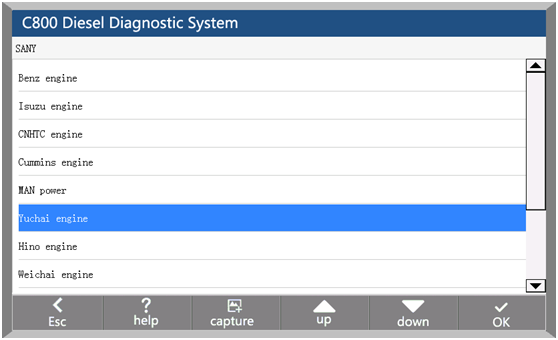
You can select the corresponding vehicle type by selecting the display area on the left side of the main interface, and then select the brand, system and system function in the right model selection area to enter the diagnosis operation.
For example: After entering the main interface of the car diagnosis, you can: click on the "truck series" -> "SANY" -> "Yuchai engine", and then select the diagnostic function you want to test diagnostic tests.





1. Enter the diagnostic system
You can select the corresponding vehicle type by selecting the display area on the left side of the main interface, and then select the brand, system and system function in the right model selection area to enter the diagnosis operation.
For example: After entering the main interface of the car diagnosis, you can: click on the "truck series" -> "SANY" -> "Yuchai engine", and then select the diagnostic function you want to test diagnostic tests.

2. Start Diagnostic
After entering the system, the functions that can be implemented include: Identification/Read Fault code/Erase Fault code/Actual Values/Actuators
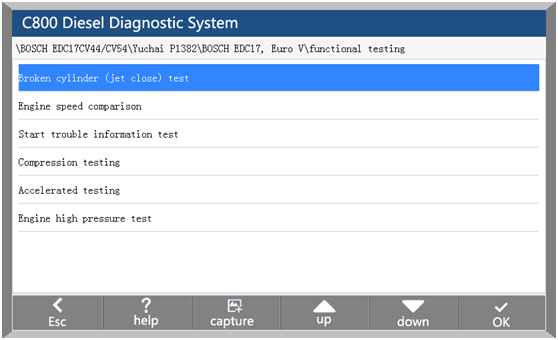
Advance Functions:Adjustment/Settings, Function Test, Special function, calibration etc.
Specific functions will be different according to different models of the brand and the system, take Bosch engine in Foton engine system as an example:

3. Identification
Identification is the vehicle and system information in ECU. When the vehicle control unit need to be replaced, it is necessary to read the original control unit information and record it as a reference for purchasing a new control unit. When the new control unit is encoded, the original control unit information is required.

4. Read Fault code
Read the fault code function can read ECU fault code to help maintenance personnel quickly found the cause of vehicle failure.

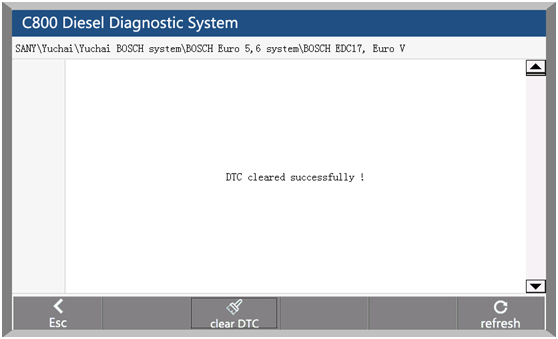
5. Erase Fault code
Clear the fault code stored in the ECU.

Note: General models, please follow the regular order, first read the fault code, and record (or print) and then clear the fault code, test, read the fault code again to verify, repair the vehicle, clear the fault code, test again to confirm the fault code The current hard fault code can not be cleared, if the oxygen sensor, knock sensor, mixed gas correction, cylinder fire and the like type of technical code can be removed immediately, but in a certain period will appear. Must be completely troubleshooting after the fault code will not appear again.
6. Actual Values
You can determine whether the various parts of the vehicle are faulty through actual values.
Method of operation:
1. After entering the diagnostic function, click "Actual values", pop-up dialog box.
2. Click the "Select All" check box to select all actual values; you can also click the check box before each actual value to select the data stream you want to read.
3. Click the "Read actual values" button. The interface displays the name, result, and unit of the data stream.

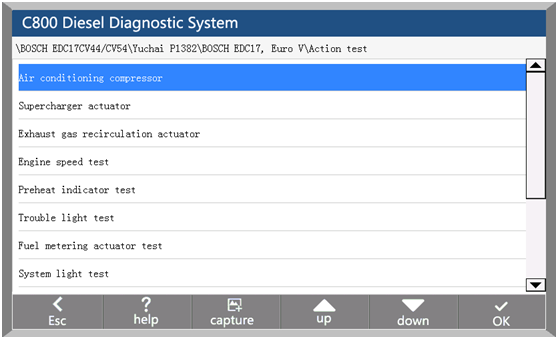
7. Actuators
In order to test the electronic control system in the implementation of components can work properly.
Method of operation:
1. After entering the diagnostic function, select "Actuators", the interface will display all the action can be tested.
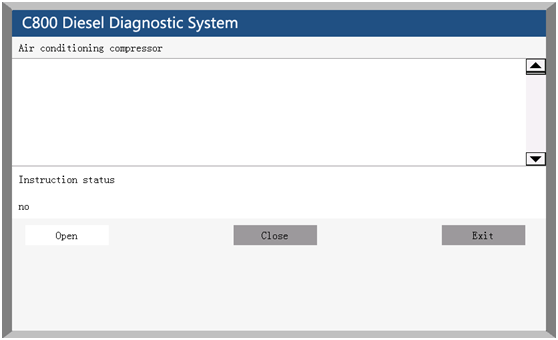
2. Click on an item to enter the action test interface. The actuators include three states: open, close, and exit.
3. Click "Open", the status of the action test is turned on.
4. Click "Close", the status of the action test is off.
5. Click "Exit" to exit this action test.


8. Advanced Function
Advance Functions: Adjustment/Settings、Function Test、Special function, calibration.
For example: diesel fuel injector code, idle speed adjustment, broken cylinder test, calibration and so on.


Wednesday, 28 February 2018
Renault can clip V175 torrent free download
Renault CAN Clip - the latest diagnostic tool for vehicles of Renault. It contains all the latest diagnostic technology and information base to address all requirements.
Renault can clip V175 torrent free download
https://mega.nz/#!MQo1wajY!wJwbgGSpMQKl5VxjPipvbpPMQLjRV0F5RnbQSvR9w4g
Tested working 100%
100% safe
O.S.: Windows Vista, Windows 7, Windows 8, Windows 8.1, Windows 10
- CPU: Intel/AMD 2 GHz or higher
- RAM: 1 GB of system memory
- Hard Drive: 5 GB of available space
- Optical Drive: DVD-ROM
- Required Hardware: Renault CAN Clip Diagnostic Interface
Language available: English, German, Danish, Spanish, Finnish, French, Italian, Norwegian, Dutch, Portuguese, Romania, Swedish.
The newest software version V175 works on all available China Can clip interfaces:
Like: Best Quality CAN Clip V175 with Full Chip AN2135SC AN2136SC
CYPRESS chip works more stable and lasts for a longer Life


Source: http://www.obd2shop.co.uk/wholesale/can-clip-latest-diagnostic-interface.html
*Also the yellow PCB version:


Source: http://www.obd2shop.co.uk/wholesale/newest-can-clip-for-renault-diagnostic-interface-with-full-chip.html
Renault can clip yellow PCB: programming works 100%!
Read: Renault Can Clip yellow PCB coverage, using tips & functions
Please enjoy
www.obd2shop.co.uk
Renault can clip V175 torrent free download
https://mega.nz/#!MQo1wajY!wJwbgGSpMQKl5VxjPipvbpPMQLjRV0F5RnbQSvR9w4g
Tested working 100%
100% safe
O.S.: Windows Vista, Windows 7, Windows 8, Windows 8.1, Windows 10
- CPU: Intel/AMD 2 GHz or higher
- RAM: 1 GB of system memory
- Hard Drive: 5 GB of available space
- Optical Drive: DVD-ROM
- Required Hardware: Renault CAN Clip Diagnostic Interface
Language available: English, German, Danish, Spanish, Finnish, French, Italian, Norwegian, Dutch, Portuguese, Romania, Swedish.
The newest software version V175 works on all available China Can clip interfaces:
Like: Best Quality CAN Clip V175 with Full Chip AN2135SC AN2136SC
CYPRESS chip works more stable and lasts for a longer Life
Source: http://www.obd2shop.co.uk/wholesale/can-clip-latest-diagnostic-interface.html
*Also the yellow PCB version:
Source: http://www.obd2shop.co.uk/wholesale/newest-can-clip-for-renault-diagnostic-interface-with-full-chip.html
Renault can clip yellow PCB: programming works 100%!
Read: Renault Can Clip yellow PCB coverage, using tips & functions
Please enjoy
www.obd2shop.co.uk
Tuesday, 13 February 2018
XTUNER E3 Easydiag OBDII Auto Diagnostic Tool Vehicle Coverage
Here is for your information: XTUNER E3 Easydiag OBDII Auto Diagnostic Tool Vehicle Coverage
Asian: ACURA, ASIAGM, DAEWOO, DAIHATSU, HONDA, HYUNDAI, INFINITI, ISUZU, KIA, LEXUS, MAZDA, MITSUBISHI, NISSAN, PERODUA, PROTON, SSANGYONG, SUBARU, SUZUKI, TOYOTA, etc.

European: ABARTH, ALFA, ASTON, AUDI, BENTLEY, BENZ, BMW, BUGATTI, CITROEN, DACIA, FERRARI, FIAT, FORDEU, JAGUAR, LAMBORGHINI, LANCIA, LANDROVER, MASERTI, MINI, OPEL, PEUGEOT, PORSCHE, RENAULT, SAAB, SEAT, SKODA, SMART, VAUXHALL, VOLVO, VW, etc.

US domestic: CHRYSLER, FORD, GM, JEEP, SCION, etc.

Australian: HOLDEN and FORD (AUSTRALIA).

OBDII vehicle: CHRYSLER, FORD, GM, TOYOTA, LEXUS, HONDA, HYUNDAI, KIA, MAZDA, MITSUBISHI, NISSAN, SUBARU, SUZUKI, ABARTH, ASTON MARTIN, BUGATTI, FERRARI, LAMBORGHINI, MASERTI, BENZ, BMW, VW, AUDI, SEAT, SKODA, PORSCHE, JAGUAR, LANDROVER, VOLVO, SAAB, ALFA, etc.

If you want to learn more information you can visit this site: http://www.obd2shop.co.uk/wholesale/xtuner-e3-easydiag-obd2-full-diagnostic-tool-with-special-function.html
Asian: ACURA, ASIAGM, DAEWOO, DAIHATSU, HONDA, HYUNDAI, INFINITI, ISUZU, KIA, LEXUS, MAZDA, MITSUBISHI, NISSAN, PERODUA, PROTON, SSANGYONG, SUBARU, SUZUKI, TOYOTA, etc.

European: ABARTH, ALFA, ASTON, AUDI, BENTLEY, BENZ, BMW, BUGATTI, CITROEN, DACIA, FERRARI, FIAT, FORDEU, JAGUAR, LAMBORGHINI, LANCIA, LANDROVER, MASERTI, MINI, OPEL, PEUGEOT, PORSCHE, RENAULT, SAAB, SEAT, SKODA, SMART, VAUXHALL, VOLVO, VW, etc.

China: BYD, CHANGAN, CHANGHE, CHERY, EMGRAND, ENGLON, FOTON, GEELY, GLEAGLE, GWM, HBSH, HUACHEN, LIFAN, WULING, YUAN, etc.


US domestic: CHRYSLER, FORD, GM, JEEP, SCION, etc.

Australian: HOLDEN and FORD (AUSTRALIA).

OBDII vehicle: CHRYSLER, FORD, GM, TOYOTA, LEXUS, HONDA, HYUNDAI, KIA, MAZDA, MITSUBISHI, NISSAN, SUBARU, SUZUKI, ABARTH, ASTON MARTIN, BUGATTI, FERRARI, LAMBORGHINI, MASERTI, BENZ, BMW, VW, AUDI, SEAT, SKODA, PORSCHE, JAGUAR, LANDROVER, VOLVO, SAAB, ALFA, etc.

If you want to learn more information you can visit this site: http://www.obd2shop.co.uk/wholesale/xtuner-e3-easydiag-obd2-full-diagnostic-tool-with-special-function.html
Wednesday, 31 January 2018
OBDSTAR X300 DP user manual: How to Register
Here is the OBDSTAR X300 DP (Full Configuration & Standard Configuration) Register guide, please keep reading to find out more.
Step 1. Connect your VCI with the main cable and the 12V power as follows:

Step 2. Turn on tablet and connect with VCI.


Step 1. Connect your VCI with the main cable and the 12V power as follows:

Step 2. Turn on tablet and connect with VCI.
1. Situation 1--- In general, it will
connect with VCI automatically after turning on the
tablet as follows:

2. Situation 2---If your tablet didn’t
connect with VCI automatically, please operate as follows:
Click “setting”—Enter “Bluetooth”—Click the
Bluetooth name of VCI to connect


Step 3. Registration
Enter ”DP”—Enter “Setting”—Begin to
register—Fill in the registration
information—Register successfully


Monday, 29 January 2018
VPECKER E4 Tablet software 5.0 version update
Good news, VPECKER E4 Tablet Diagnostic Tool Client software can upgrade to 5.0 version. Here in this post, I will show you more details.
1,Optimize UI display.
2,Fix some bugs.
3,Improve diagnostic capabilities and communication layer stability.
4,New model software update reminder.
5,Optimization of diagnostic data flow interface interaction.
6,New freeze data stream refresh function.
7,Add history reminder for diagnostic menu click.

VPECKER E4 Tablet Upgrade and Installation in 3 steps:
http://blog.obd2shop.co.uk/vpecker-e4-tablet-upgrade-and-installation-in-3-steps/
VPECKER E4 Tablet Upgrade and Installation file download:
http://www.obd2shop.co.uk/upload/pro/vpecker-e4-tablet-update-and-installation-guide.pdf
1,Optimize UI display.
2,Fix some bugs.
3,Improve diagnostic capabilities and communication layer stability.
4,New model software update reminder.
5,Optimization of diagnostic data flow interface interaction.
6,New freeze data stream refresh function.
7,Add history reminder for diagnostic menu click.

VPECKER E4 Tablet Upgrade and Installation in 3 steps:
http://blog.obd2shop.co.uk/vpecker-e4-tablet-upgrade-and-installation-in-3-steps/
VPECKER E4 Tablet Upgrade and Installation file download:
http://www.obd2shop.co.uk/upload/pro/vpecker-e4-tablet-update-and-installation-guide.pdf
Subscribe to:
Posts (Atom)